Icon of program: Samsung DeX

Samsung DeX for Mac

  • Free
  • 3
    2
  • 17.7K
  • V2.4.1.23

Turn your phone into a PC for free with Samsung DeX

Samsung DeX is a free application that can be used to create a PC-like experience by using your phone. The application allows you to connect to an external monitor and use your phone on a bigger screen. Most mobile applications are compatible with Samsung DeX. The application aims to make it easier for professionals to remain productive even when they are on the go. AirDroid Desktop and Vysor are similar applications to Samsung DeX.

Connect a bigger screen to your phone

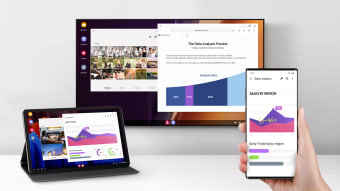
Samsung DeX gives you a PC-like experience by allowing you to connect your phone to a larger screen. The application mirrors your phone's screen, and you can use almost all apps as you would normally when in DeX mode.

You can connect using two methods

Samsung DeX mode offers multiple connection methods can be accessed by using a USB-C to HDMI cable or by connecting to a compatible Wi-Fi enabled smart TV.

You can access most applications from DeX mode

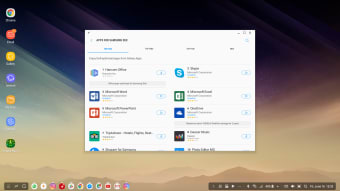
Samsung DeX allows you to use most of the applications on your phone in DeX mode. This gives you access to a more familiar PC-like experience when using your phone and allows you to use functions like copy/paste and drag/drop, similar to when using a computer. This works well for text editors, presentation software, and other productivity applications.

Run presentations directly from your phone

The Samsung DeX applications allow you to run slideshows and other presentations directly from your phone without the need for a computer. This feature makes it easier to have presentations on the go and without the need for carrying around more devices than just your phone.


  • Pros

    • Can be used on both Windows and Mac OS.
    • Wireless mode is available.

    • Most applications are compatible with DeX.

    • Allows you to use your phone with larger screens.
  • Cons

    • Some applications cannot be used in DeX mode.
    • Not all monitors/televisions are compatible with DeX.
    • Application only works with Android.
    • The application is battery-intensive when in use.
 0/3

App specs

Also available in other platforms

Program available in other languages


Icon of program: Samsung DeX

Samsung DeX for Mac

  • Free
  • 3
    2
  • 17.7K
  • V2.4.1.23

User reviews about Samsung DeX

Have you tried Samsung DeX? Be the first to leave your opinion!

Add review

You may also like

Alternatives to Samsung DeX

Explore Apps

Latest articles

Laws concerning the use of this software vary from country to country. We do not encourage or condone the use of this program if it is in violation of these laws.
Softonic

Is Samsung DeX safe?

100/100

Score result: Clean

This file passed a comprehensive security scan using VirusTotal technology. It is safe to download.

  • Virus free
  • Spyware free
  • Malware free
  • Verified by Security Partners

    VirusTotal logo

Scan Info

Last scan
Wednesday, August 14, 2024
Scan provider
VirusTotal · Full report

File Integrity

File
Samsung_DeX_V2.4.1.23.dmg
SHA256
6bf45739e81ad7970ae86147b64bc1df3392154b00672243fb666c62c983a9f6
SHA1
ac095a2baef5befbdd5eee1e68298868ba932c6e

Softonic security commitment

Samsung DeX has been thoroughly scanned by our advanced security systems and verified by industry-leading partners. This file comes from the official developer and has passed all our security checks, showing no signs of viruses, malware, or spyware. For more information, visit our Security and Trust Center